Using debouncing in functional components

Tinkerer | Product Engineer
What is debouncing
Debouncing is a technique or a pattern that can be used to solve commonly occurring problems like grouping multiple side effects of an event into a single effect.
The original idea comes from electronics like when we press a button on a remote,
once a signal from the button is received, the microchip stops processing signals from the button for a few microseconds while it’s physically impossible for you to press it again.
Use cases
Autosaving feature in text editors
Suppose we have a text editor which helps the user to type something and save the data to the backend.
Setup
import * as React from "react";
import "./styles.css";

export default function App() {
  const [content, setContent] = React.useState<string>("");
  const [dbState, setDbState] = React.useState<string>("");

  // database call to  persist the content
  const saveToDb = (data: string) => setDbState(data);

  const onContentChange = (e: React.ChangeEvent<HTMLTextAreaElement>) => {
    const { value } = e.target;
    setContent(value);
    saveToDb(value);
  };

  return (
    <div className="App">
      <h1>Text Editor example</h1>
      <textarea
        name="content"
        id="content"
        cols={40}
        rows={10}
        className="editor"
        placeholder="type here"
        value={content}
        onChange={onContentChange}
      ></textarea>

      <div className="states-container">
        <div className="state-container">
          <h4>💻 Client State</h4>
          <span>{content}</span>
        </div>
        <div className="state-container">
          <h4>🗄️ Database State</h4>
          <span>{dbState}</span>
        </div>
      </div>
    </div>
  );
}
So what's happening?
We have a simple textarea acting as an editor in any app. And we have a state i.e. content that we have hooked with the textarea, standard react nothing fancy.
But we have another state dbState which is representing our database state in the backend.
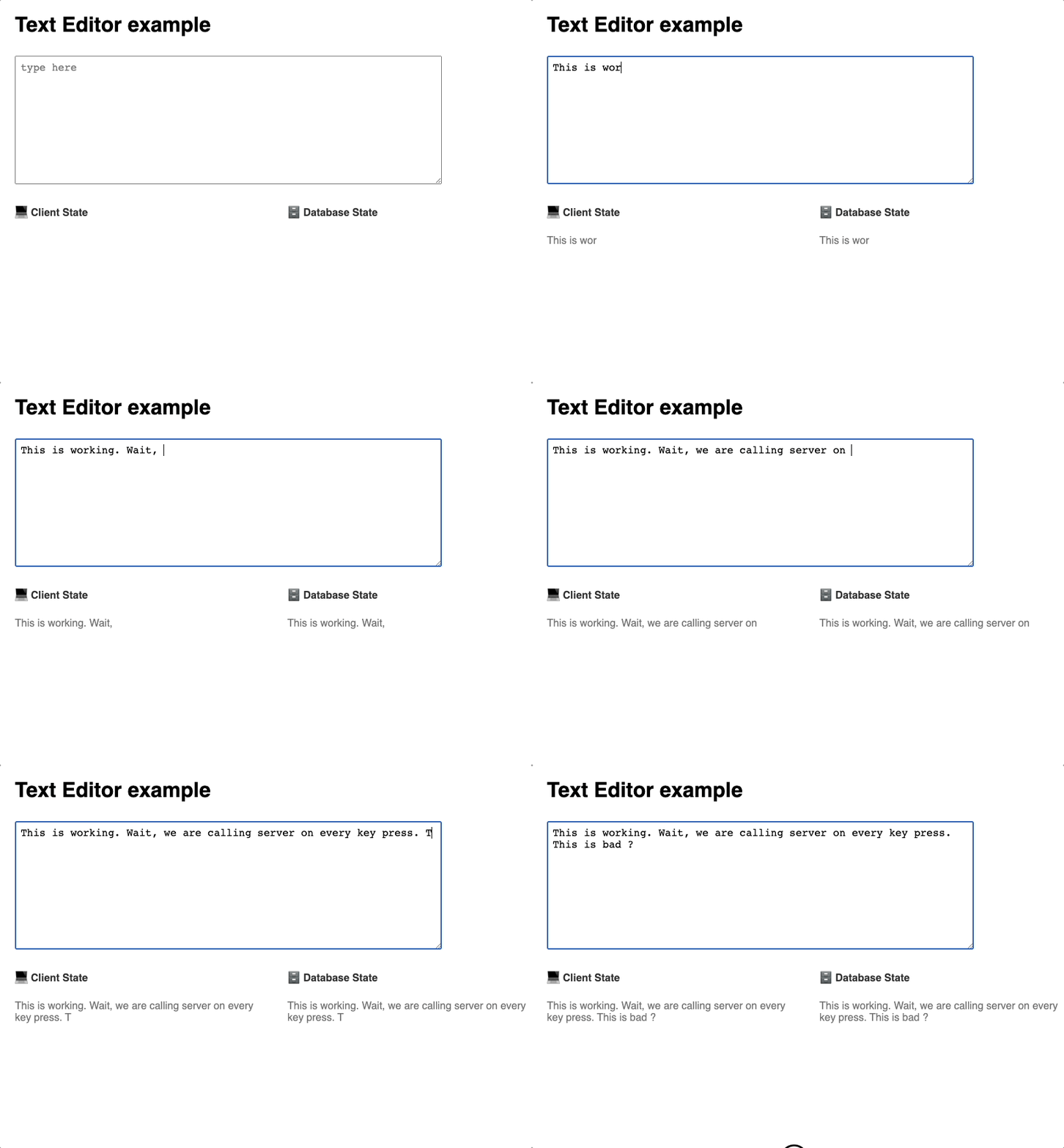
As the user starts typing we see our content state being updated and displayed in the bottom left, and right after that, we call setDbState to update the database state, which is basically simulating an API call to any remote server and that is being displayed on the bottom right
Preview
Hmmm 🤔
Problem
I am sure you can see the core problem here. We are basically making an API call to save the content every time the user types something. This may put a lot of unnecessary load on your backend server depending on your app popularity and usage. Here the side effects are multiple calls to the backend server for saving data and the event is user typing.
So how do we go about solving this?
Well if we think about it,
we have to somehow know if the user has paused typing for some time, and during that time we call our API to save data in bulk instead of every keypress.
or the other way of saying this is
if the user has not typed anything for let's say
tseconds, we will call the API to save the data. Before that, we need to somehow ignore the previous API calls.
Let's implement a function that can do this
export function debounce(func: (args: any) => void, timeout: number = 300) {
  let timer: number;

  return (...args: any) => {
    clearTimeout(timer);

    timer = setTimeout(() => {
      func.apply(this, args);
    }, timeout);
  };
}
So what's happening ?
Basically, we have a function debounce that takes 2 arguments
func: the function that we want to calltimeout: after how many seconds we are going to call the passes function
- We first create a timer using the
letkeyword because we need to override this. - Then we return a function, we destructured all the arguments the function may receive
- We clear the timer using
clearTimeoutIf we have any. (maybe from the previous call) - We start a new timer using
setTimeoutand inside the callback, we call ourfuncand pass the context and arguments.
Let's use this in our app
  // database call to  persist the content
  const saveToDb = (data: string) => setDbState(data);

  // debounced version of saveToDb
  const debouncedSaveToDb = debounce(saveToDb, 1000);

  const onContentChange = (e: React.ChangeEvent<HTMLTextAreaElement>) => {
    const { value } = e.target;
    setContent(value);
    debouncedSaveToDb(value);
  };
We created a debounced version of our saveToDb function. And now we calling deboundedSaveToDb in our onContentChange function whenever we change the editor content.
What to expect?
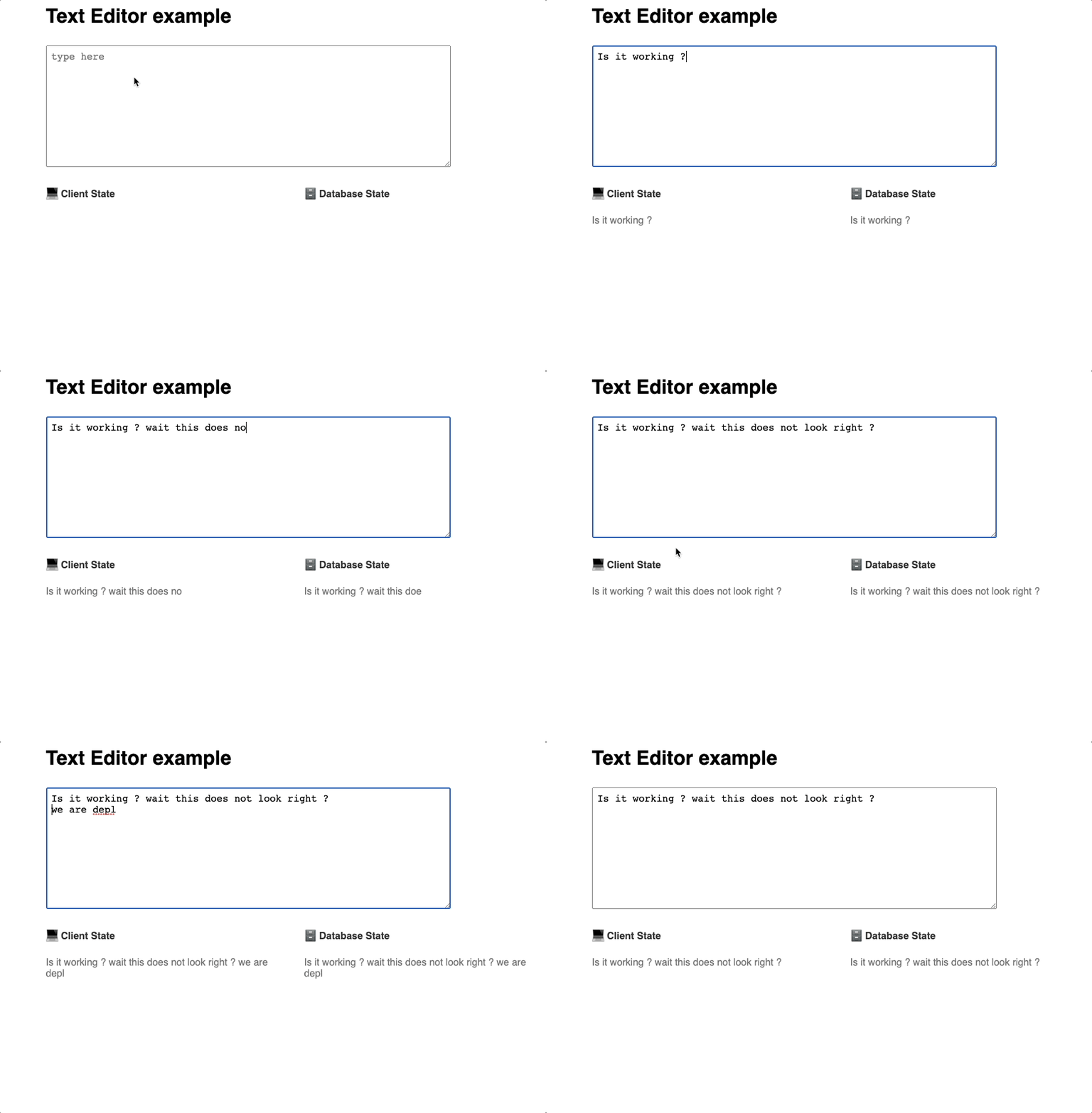
When we start typing our client state i.e content should update and reflect in the bottom left panel. But our database state i.e dbState should wait for the user to stop typing for a certain period of time to update dbState in one short and should be reflected in the bottom right panel.
Will this work?
hmmm 🤔
This is not what we expected right? The issue here is
instead of debouncing words and sentences we are debouncing each character as they are typed.
After typing a character our component is triggering the deboundedSaveToDb which internally calls saveToDb with the typed character.
Why is this happening?
The root cause is react re-rendering, Let me explain
Whenever a user types a character our content state changes and react will re-render the entire component which is normal. But we will also get a fresh deboundedSaveToDb function on every re-render hence the debouncing effect will not work because the timer will be different for each character typed.
So what's the solution?
We have to stop creating fresh deboundedSaveToDb on every re-render. This should be only created once, basically we want to memoize deboundedSaveToDb function. And we have useCallback for the same in react.
Let's see how we can modify our code to fix this
 // database call to  persist the content
  const saveToDb = (data: string) => setDbState(data);

  // memoized debounced version of saveToDb
  const debouncedSaveToDb = React.useCallback(debounce(saveToDb, 1000), [ ]);
As we can see we are using useCallback to tell react that only re-create debouncedSaveToDb when these dependencies changes i.e [ ], We can see that the dependency array is empty which implicitly means only create this once.
Result
🎉 working
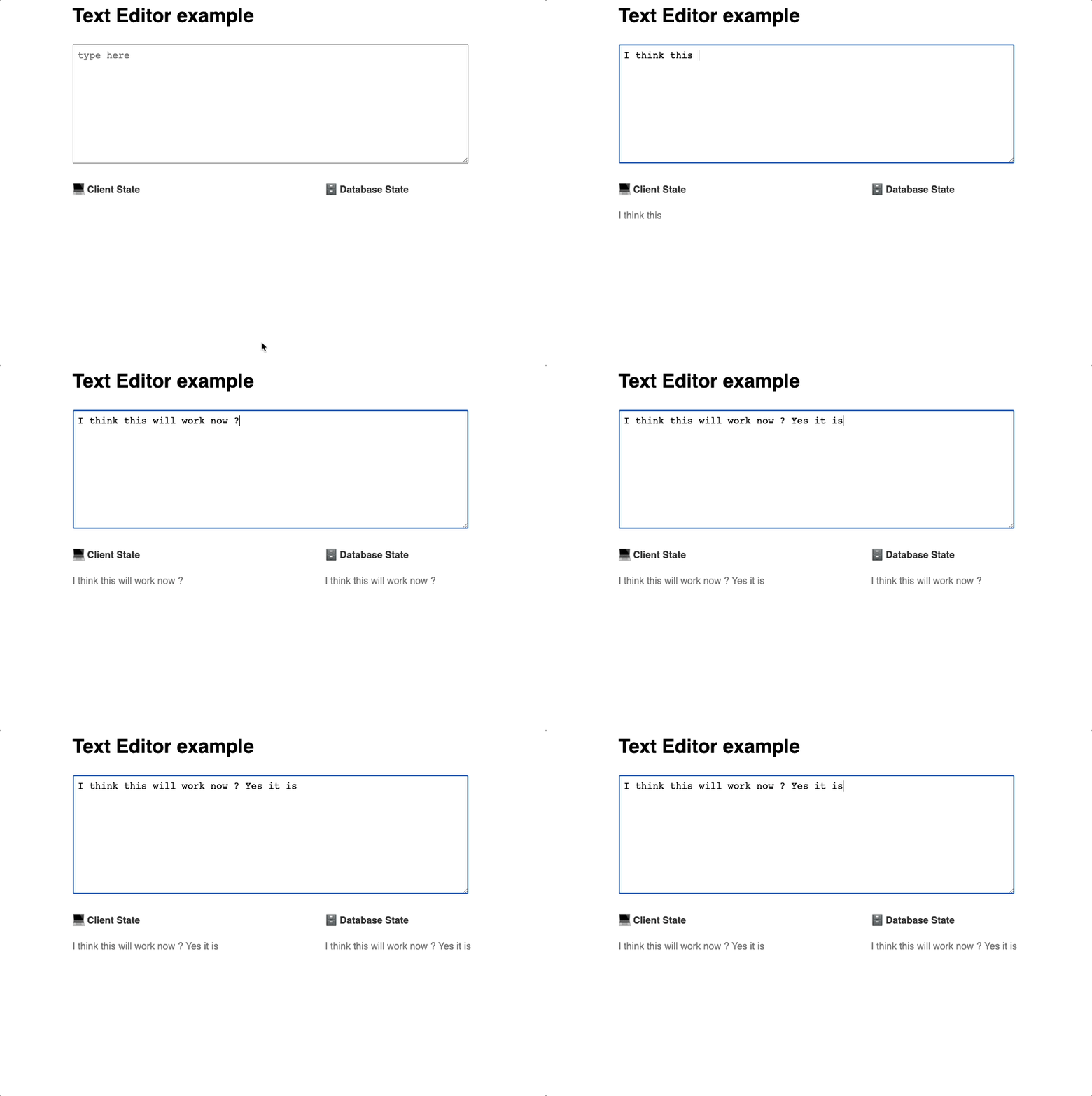
As we can see we are perfectly batching all the changes and triggering saveToDb when user stopped typing for a certain period of time.
We can also achieve the desired result using ref
We can use useRef to store debouncedSaveToDb after creating and this will make sure it does not get affected when react re-renders the component.
  // database call to  persist the content
  const saveToDb = (data: string) => setDbState(data);

  // memoized debounced version of saveToDb

  // const debouncedSaveToDb = React.useCallback(debounce(saveToDb, 1000), []);

  const debouncedSaveToDb = React.useRef(debounce(saveToDb, 1000)).current;
The result will be similar to the useCallback approach.

